Reducing Onboarding Friction for a SaaS Platform
As head of design and front-end developer, I designed and built a Word-to-proposal importer that cut setup from hours to minutes, driving a 47% adoption rate and reducing onboarding drop-off.
Problem
Existing content couldn't get into the platform
Most users already had proposals in Word docs. Getting that content into Better Proposals meant manually copy-pasting every section, reformatting text, and rebuilding structure from scratch.
Before jumping into solutions, I mapped out the full user journey: every file type, section structure, failure state, and the points where users would need guidance versus automation. This flow became the single source of truth for the team, surfacing edge cases early and aligning engineering, product, and design before writing any code.
Key Decision
A guided conversion, not an auto-import
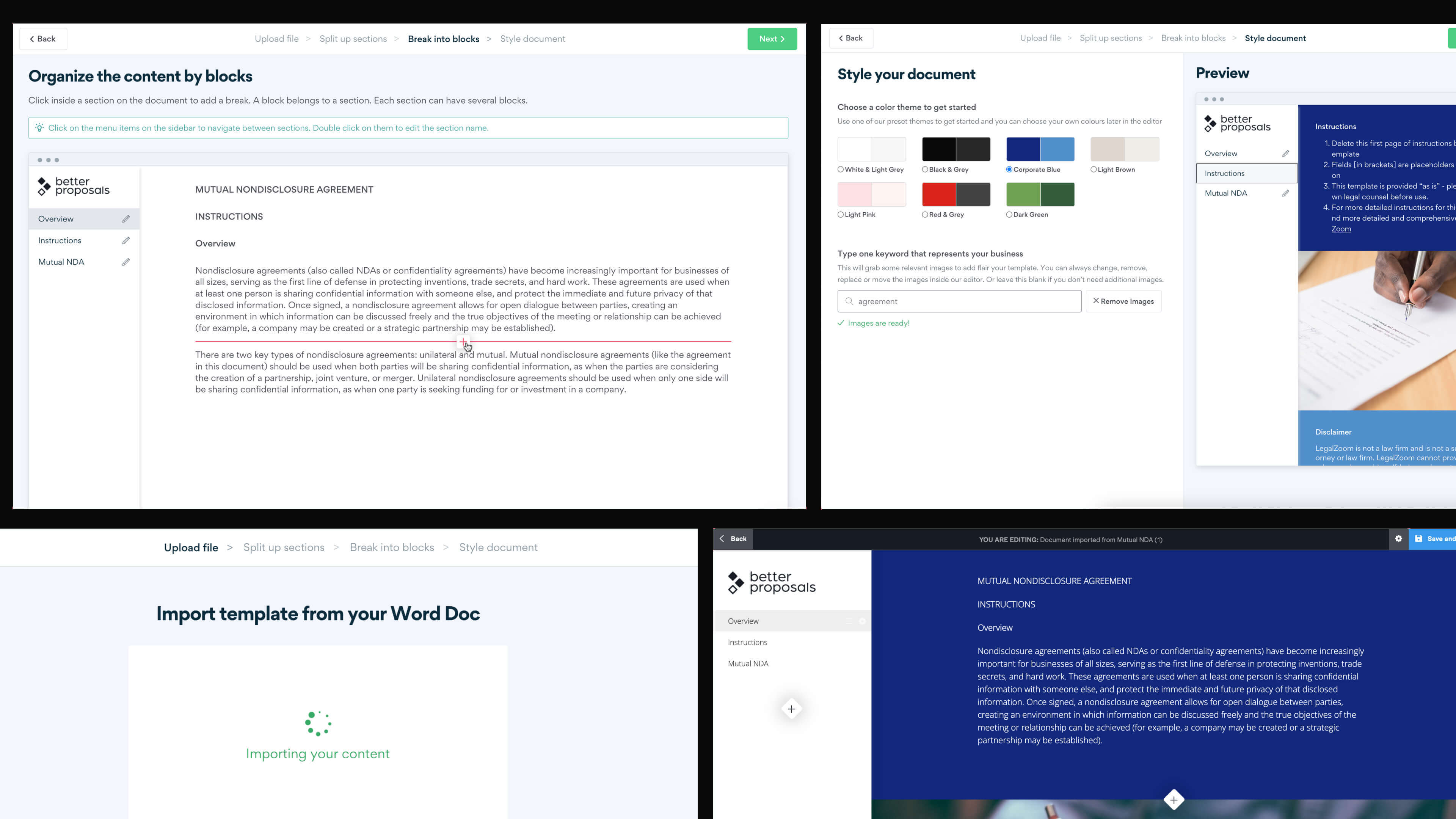
Auto-converting Word docs wasn't viable: formatting is wildly inconsistent, and the platform needs structured sections and blocks that don't exist in a flat document. I designed a 3-step guided flow that puts them in control while doing the heavy lifting behind the scenes.
Step 1
Split into sections
Users hover between paragraphs and click to create section breaks. Each section maps to a sidebar item in the final template. This gives users control over document structure without needing to understand the platform's internal model.
Step 2
Break into blocks
Within each section, users split content into individual blocks. Blocks are the design units: each can have its own background, layout, or media. I suggested splitting headers from body content at minimum, so users could add visual hierarchy later without reworking structure.
Step 3
Style and brand
Pre-defined colour themes, generated stock images from a keyword search, and full customisation options. Users go from a plain Word doc to a branded, web-ready proposal without touching CSS or starting from a blank canvas.
Outcome
Removing the #1 reason users didn't convert.
Document import was the top requested feature and a leading cause of onboarding abandonment. The importer turned existing Word docs into branded, trackable proposals in minutes, removing the biggest barrier between signup and first sent proposal.
faster onboarding at the top end: setup went from 30-60 min to under 5
fewer support tickets per year, freeing the team for higher-value work
of new users adopted the importer within the first month
Adoption measured in PostHog and confirmed by customer success. Other metrics estimated from support volume trends, session data, and customer success feedback. View the customer's reviews after the Document Importer launch.
Source: betterproposals.io

Kyle Van-Deusen
Ogal Web Design
"When a customer is choosing between someone sending over a word doc, and my proposal, it's a no-brainer."

Ashley Ball
Slidespace
"It's turned a whole process that was time consuming and clumsy, into a streamlined, singular step. I love it!"

James Steadman
JC Steadman Marketing
"My clients love the format, and it saves me about 40 minutes for each proposal... a win-win for all involved."

Eric Racedo
Nashville Web Design
"My proposals take a fraction of the time to make, they're always improving and I'm watching my leads close at higher rates."

Nikki Takahashi
Fetching Finn
"What took me 2 hours to prepare before, now only takes a few minutes and carries much more WOW factor."
Process
Shipped in one Shape Up cycle
I owned design and front-end, from user flows and prototypes in Figma through to production HTML, CSS, and JavaScript, pairing with one back-end developer on PHP 8+. From ideation to implementation in 6 weeks.